Duration
8 wk
Level
Beginner
Certification
Included
Format
Hands-on
Complete Basic Computer Course
Build essential computer, Microsoft Office, and internet skills for work, business, and daily life.
Learning Objectives
What you'll achieve
Operate computers confidently for personal and professional use
Navigate Windows, manage files, and maintain a PC
Type accurately and use the full Microsoft Office Suite (Word, Excel, PowerPoint)
Browse the internet safely and communicate via email and video conferencing
Apply computer skills to job applications, NGO work, and daily life
Troubleshoot common PC problems and complete a final portfolio project
Curriculum
Comprehensive learning path
Module 1: Computer Fundamentals
Topics Covered
- •Introduction to computers: definition, types, uses
- •Hardware: CPU, monitor, keyboard, mouse, printer, storage
- •Software: system vs application software
- •Booting, shutting down, restarting safely
- •Basic computer care and maintenance
Skills You'll Gain
- •Understand what a computer is and how to use it
- •Practical: identify ports, power on/off, use mouse & keyboard
Module 2: Windows OS & File Management
Topics Covered
- •Windows desktop, taskbar, start menu
- •File Explorer: create, rename, copy, move, delete
- •Installing and uninstalling software
- •Control Panel and settings
- •Data backup using USB/external drive
Skills You'll Gain
- •Navigate and organize files like a pro
- •Practical: organize a "SNMTIF Student Files" folder system
Module 3: Typing & Productivity Tools
Topics Covered
- •Keyboard mastery: home keys, special keys, shortcuts
- •Touch typing practice: 25+ WPM target
- •Introduction to Microsoft Office Suite
Skills You'll Gain
- •Build typing speed and accuracy
- •Practical: daily 15-minute typing test
Module 4: Microsoft Word
Topics Covered
- •Document creation, formatting, fonts, paragraphs
- •Insert: tables, images, headers, footers, page numbers
- •Spell check, mail merge, print preview
- •CV/letter writing, flyers, reports
Skills You'll Gain
- •Create professional documents
- •Practical: type and format a Memorial Foundation letterhead + CV
Module 5: Microsoft Excel
Topics Covered
- •Spreadsheet basics: cells, rows, columns
- •Formulas: SUM, AVERAGE, COUNT, IF
- •Formatting, borders, cell alignment
- •Charts and graphs
- •NGO data entry: student records, expenses, attendance
Skills You'll Gain
- •Manage data and simple calculations
- •Practical: create an SNMTIF student attendance + donation tracker
Module 6: Microsoft PowerPoint
Topics Covered
- •Slide design, themes, layouts
- •Insert: text, images, audio, video, animations
- •Slide transitions and presentation skills
- •Creating proposals and project pitches
Skills You'll Gain
- •Present ideas visually
- •Practical: build an "SNMTIF Impact Presentation" project
Module 7: Internet & Digital Communication
Topics Covered
- •Browsing: Google search, research skills
- •Email: Gmail setup, send/receive, attachments, etiquette
- •Video conferencing: Zoom, Google Meet
- •Social media for NGOs: Facebook Page, WhatsApp Business
- •Online safety, cyber security, passwords, scams
Skills You'll Gain
- •Use the internet safely and professionally
- •Practical: create a professional email + join a Zoom class
Module 8: Troubleshooting & Final Project
Topics Covered
- •Common PC problems: freezing, no internet, printer issues
- •Antivirus, cleaning temp files, Task Manager
- •Introduction to Canva and Google Tools: Docs, Sheets, Drive
- •Final project: complete portfolio (Word doc + Excel sheet + PPT)
- •Assessment, certification, and graduation
Skills You'll Gain
- •Solve basic problems and showcase skills
Prerequisites
What you need before starting
No prior computer experience required
Basic literacy skills
Willingness to learn
Commitment to attend all sessions (3 days/week)
Don't worry if you don't meet all requirements - our instructors are here to help you succeed!
Schedule & Format
When and how you'll learn
Training Format
70% Practical, 30% Theory — hands-on exercises every class, weekly assignments, and one major project, using projector, computers, and real-life NGO examples
Frequency
3 Days per Week
Time Slots
Next Cohort
December 2026
Applications open 2 months before cohort start date
Certification
Credentials you'll earn
Certificate Type
Certificate of Completion in Basic Computer Skills
Issued By
Sunday Nnaemeka Memorial Tech Innovation Foundation
Requirements
Continuous Assessment 40% (attendance, assignments, tests) + Final Project 30% + Final Exam 30%
Recognition: Industry-recognized digital literacy certification
Materials & Equipment
What we provide
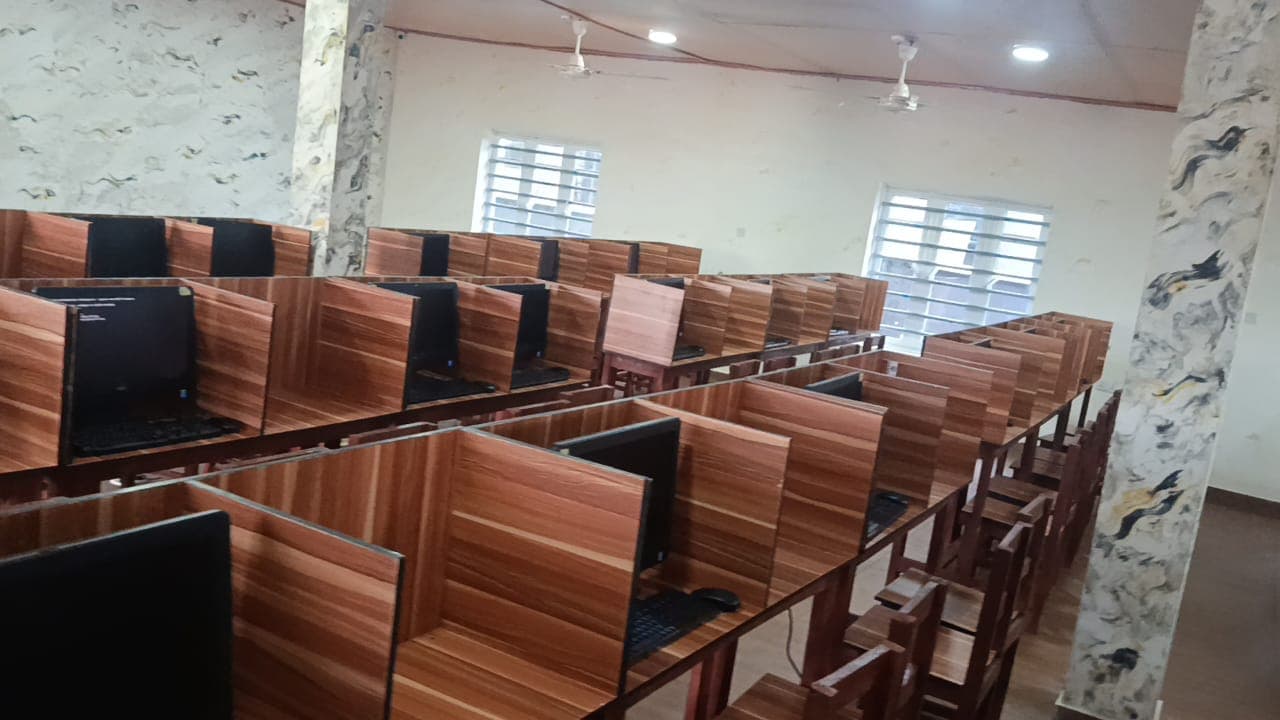
- Computer workstations
- Microsoft Office software
- Training materials and handouts
- Internet access
- Practice exercises and projects
All materials are included in your training. No additional purchases required.
Your Instructor
Learn from industry experts

Uwadiegwu Obidike P.
Basic Computer Instructor
B.Sc. in Psychology. Fluent in Igbo, English, and Yoruba. Age 41.
Ready to Start Your Journey?
Join our Complete Basic Computer Course program and gain the skills you need to build a successful career.